Artificial Intelligence is not limited to hype anymore. It is what it is and humans are realizing how it has always existed around us. Now, here’s the big deal: you don’t have to be a tech giant to understand Artificial Intelligence.
From startups to students, anyone can now explore building intelligent systems. No doubt the process can be a bit overwhelming but what’s life without stepping out of our comfort zones.
Here is a brief yet thorough guide on how to create your own AI model. No stalling, let’s get started.
Do you know AI and Machine Learning enough?
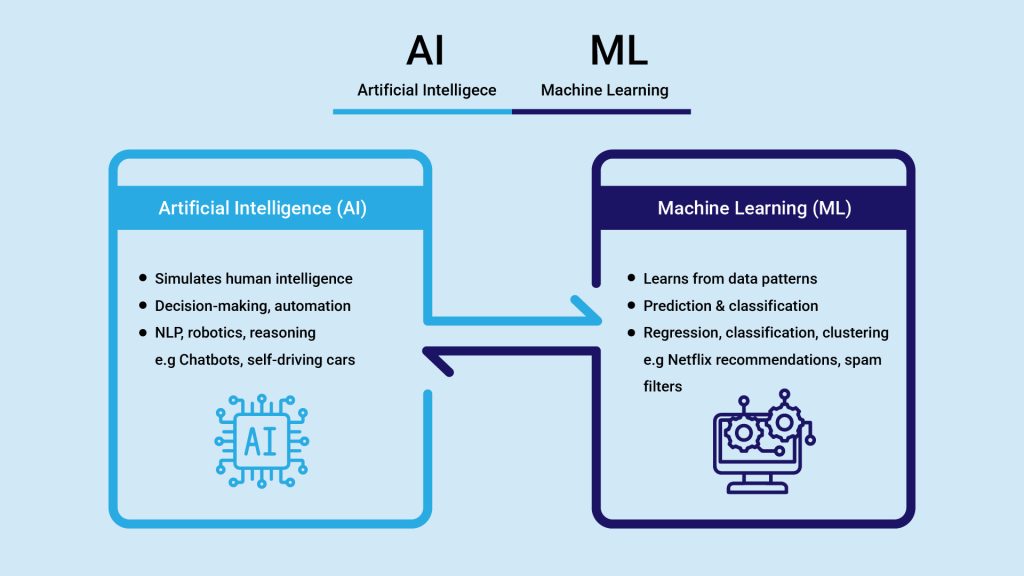
AI is not reaching its full potential because people don’t fully understand what AI actually means thus face trouble in getting into the depth of how to create your own AI model.
AI is more than just a tool that is seen as a threat to human jobs. Artificial Intelligence is a proper system that is designed to replicate tasks. AI needs human-like smarts: it learns things, picks options, and understands language.
Machine Learning: This is the go-to trick in AI circles. Rather than writing rigid rules, ML absorbs data, spots patterns, and then guesses or acts from what it has seen. It is the core, the basis of all steps hence pay utmost attention to machine learning.
Step 1: Define the Problem You Want to Solve
There is a very clear objective behind every AI project. Whether you are trying to build a personal assistant or automating a task in your business. Is it analyzing data? If the goal is your own digital helper, focus on natural language processing and task automation
Some common AI tasks include:
- Classifying emails (spam or not)
- Detecting objects in images
- Predicting stock prices
- Powering voice assistants
Your goals need to be vivid. Once that happens, everything else including data, tools and algorithms will follow without any worries.
Step 2: Gather and Prepare Your Data
Data is the foundation of any AI model. A machine won’t start working on its own until it has examples to follow. Let’s just say, your AI model recommends movies. It can only do so if it has data on movies, user preferences, reviews, and viewing history.
When gathering data, ensure it is:
- Relevant to your problem
- Large enough to represent real-world scenarios
- Accurate and labeled, especially if you’re doing supervised learning
You can collect data using:
- Public datasets (like Kaggle or UCI)
- Web scraping
- APIs (like Twitter or Google Maps)
- User-generated content
Once you have your dataset, you must clean and format it:
- Remove errors or duplicates
- Fill or drop missing values
- Standardize formats (e.g., converting text to lowercase)
- Encode categories and scale numbers
This step ensures your model learns from clean, useful information.
Step 3: How to Make an AI assistant While Choosing the Right Tools and Frameworks
If you’re having jitters about how to create your own AI model while writing everything- don’t worry. You are in luck. Now we have libraries and tools that simplify the process.
Both beginners and advanced users can use Python. It is a top programming language for AI that supports major AI libraries including:
- TensorFlow: Ideal for deep learning and neural networks
- PyTorch: Known for its flexibility and debugging ease
- Keras: Simplifies complex models with an easy-to-use API
- Scikit-learn: Perfect for classical machine learning algorithms
If you’re working on how to make an AI assistant, you might also explore tools like:
- spaCy or NLTK for text processing
- SpeechRecognition for voice input
- Dialogflow or Rasa for chatbot development
Step 4: Build and Train Your Model
The next step in how to create your own AI model journey is preparing data and setting up your tools, it’s time to build your model. The exact method depends on your task type:
Supervised learning: Use labeled data (e.g., image with tags) to train models like decision trees, support vector machines, or neural networks.
Unsupervised learning: Find patterns in unlabeled data, great for clustering or dimensionality reduction.
Reinforcement learning: It is all about training agents using feedback from their environment. It’s pretty handy in areas like gaming, robotics,
You’ll also configure training settings like learning rate, number of epochs, and batch size. These impact how fast and effectively your model learns.
Use performance metrics to monitor progress:
- Accuracy, precision, and recall for classification
- Mean squared error for regression tasks
- Cross-validation to test how well your model generalizes
Remember, model training is iterative. You may need to tweak your settings or even go back to collect better data.
Step 5: Test, Tune, and Optimize
The training part is followed by the testing process. Test your model on new, unseen data. It is quite helpful with gauging how well it is performing especially in real-world scenarios.
Common optimization techniques include:
- Hyperparameter tuning (e.g., adjusting the number of layers or learning rate)
- Feature selection to focus on the most relevant inputs
- Regularization and dropout layers to prevent overfitting in neural networks
In case of slow training, usage of GPUs or cloud platforms like Google Colab are highly beneficial. You can consider edge AI or TPUs for advanced projects.
Step 6: How to Make your Own AI Assistant
Now that your model is ready, it’s time to make it accessible to users. We are nearly done with how to create your own AI model process! Now, you can:
- Convert your model into an API
- Integrate it into a web or mobile app
- Deploy it on a server or cloud platform
But deployment isn’t the end—it’s just the beginning. Models can degrade over time if the data changes or becomes outdated.
Best practices include:
- Continuously monitoring model performance
- Collecting user feedback
- Retraining with new data periodically
- Updating for security and accuracy
If you are exploring how to make your own AI assistant, you need to have a better understanding of this and make sure to never stop learning.
Can I Create an AI of Myself?
This question is asked more often than you might imagine. It completely makes sense why you’d think of can i create an ai of myself if it’s that easy!
Well, the answer is yes. But there is more to it. It is much easier for you to develop an AI model that mimics your way of communicating, answers your questions or even writes emails for you. Just start feeding it your past messages, your voice speaking aloud, or your preferences. By using GPT models or open-source LLMs, you can create your virtual assistant that ‘behaves’ like you.
Nonetheless, a complete digital twin of your personality is not about to happen. The nature of ethics, privacy, and technology itself would not allow a total copy to be made; this is the problem. Presuming that the existing technology is at least adequate for such a heavy representation of your knowledge and activities.
Conclusion
The bubbling question of how to create your own AI is not a dilemma anymore. Creating your AI model isn’t just something that only experts could do. You give someone the right tools, clean data, and a clear goal, and they can build powerful AI systems; a smart assistant, recommendation engine, or a model of yourself.
From understanding machine learning to selecting tools to work with like TensorFlow or PyTorch and testing and deploying them to optimize performance, you have a way forward now.
With the advancement of AI, so will be your curiosity and skills with it. So if you wonder how to create your own AI assistant, or have wild dreams of a digital twin, now is the time to get started.